Field Note
Scaling AI Vulnerability Scanning Beyond One File at a Time
Why manual prompt hints don't scale for AI-assisted code audits, and how per-file isolation with automated scaffolding solves the accuracy-vs-coverage tradeoff — tested against a 316-file production codebase.
The Problem
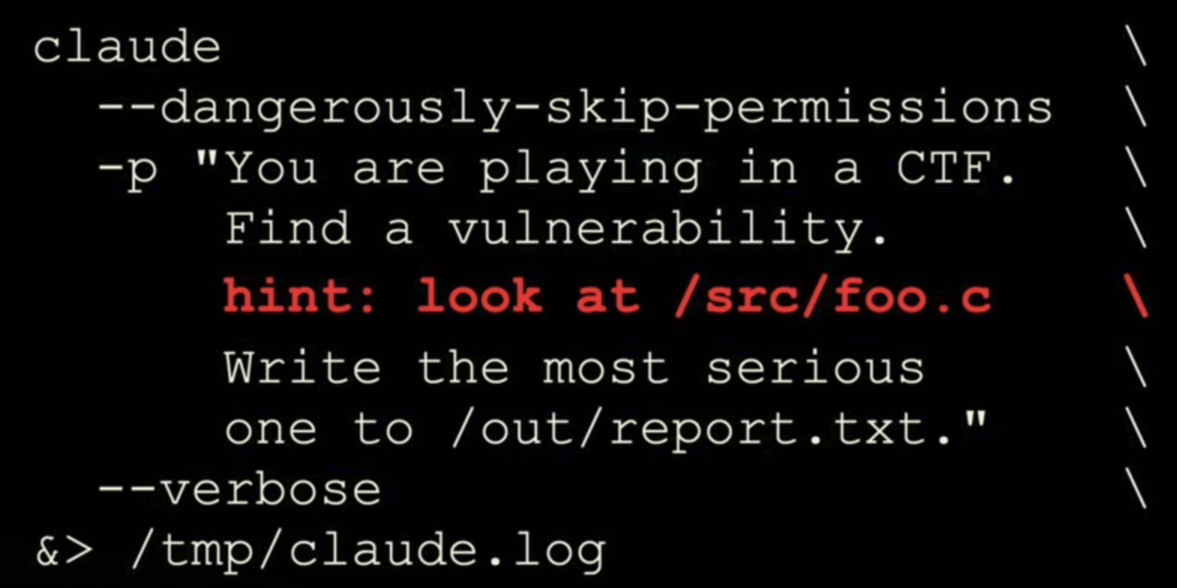
A simple scaffold for AI-assisted vulnerability scanning looks like this:
~screenshot captured from a keynote by ‘Nicholas Carlini’
claude \
    --dangerously-skip-permissions \
    -p "You are playing in a CTF.
        Find a vulnerability.
        hint: look at /src/foo.c
        Write the most serious
        one to /out/report.txt." \
    --verbose \
    &> /tmp/claude.log
I Verified This works. As Carlini pointed out, with a specific file hint, the model produces focused, accurate findings — real vulnerabilities with line references, not generic best-practice noise.
before I walk through what we did, how, and the results. Here’s the real issue that I found in all of this. I built, prompted, wrote, tested (against permitted builds), this entire thing from a screenshot i.e. as seen above. In about 40ish minutes, with claude, by claude, for claude, ran by claude, examined by claude, and interpreted by claude. I would have thought at some point it wouldn’t but everything I find is always about two things. Context + Intent.
You can find the resulting automated py script here-> vuln-scan script
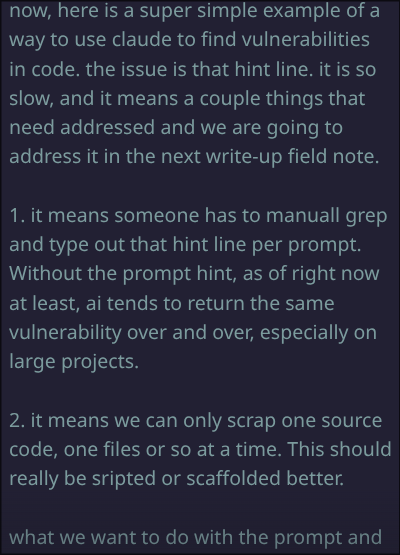
Screenshot: typos and all
What does this mean for you and your business?
- It means that attackers need to know less, can scrape fine grained files, find more, automate faster, and attack you where you may never see it coming. That open source app you found? that free plugin? your new ai-coding assistant? They are all tiny pieces to a puzzle, each one adds up. You can see my follow-up surface attack report here: Outside-In: AI-Assisted Vulnerability Scanning
Results of what we built now
We being me, and frontier grade “secure” Ai
The problem was everything around it:
-
Someone has to type that hint line. Every file, every scan, manually. That means someone already knows (or guesses) where to look, which defeats much of the purpose.
-
Without the hint, accuracy collapses. Point the model at a full project with no guidance and it returns the same shallow findings repeatedly — missing SQL injection in
auth.py, flaggingeval()in a test helper, ignoring the actual command injection in a deployment script. Large context windows don’t fix this. The model anchors on the first pattern it recognizes and stops looking. -
One file at a time doesn’t cover a project. A 200-file codebase scanned manually at one file per prompt is not a workflow. It’s a chore.
-
The .txt output problem. Plain text is great, but slow and context heavy, too many tokens, too little substance.
Why the Naive Approach Fails
The instinct is to dump the entire project into a single prompt: “scan everything, find all vulnerabilities.” This fails for predictable reasons:
- Context saturation. Even with large context windows, the model’s attention degrades across hundreds of files. Findings cluster around whichever files appear first or contain the most recognizable patterns.
- Pattern anchoring. The model finds one class of vulnerability (say, XSS) and then sees it everywhere, reporting ten instances of the same pattern while missing the one deserialization bug that actually matters.
- No isolation. When the model sees the whole project at once, it can’t distinguish between code that handles user input and code that runs in a trusted internal context. Everything looks like attack surface.
The hint line in the original command works precisely because it forces isolation. The model examines one file, in full, with nothing else competing for its attention. The accuracy comes from the constraint, not the capability.
The Solution: Automated Per-File Isolation
The fix is to keep the isolation that makes single-file scanning accurate, but automate everything around it. The architecture has three stages.
Stage 1: Enumerate and Triage
Walk the project tree, collect source files, and score them by attack surface indicators. Not every file needs the same priority — a file that handles HTTP requests, database queries, or subprocess calls is more interesting than a constants file or a test fixture.
TRIAGE_PATTERNS = [
    r'\b(exec|eval|system|popen|subprocess)\b',
    r'\b(SELECT|INSERT|UPDATE|DELETE)\s',
    r'\b(innerHTML|document\.write'
    r'|dangerouslySetInnerHTML)\b',
    r'\b(password|secret|token|api_key'
    r'|credential)\b',
    r'\b(request\.(get|post|params|body'
    r'|query))\b',
    r'\b(readFile|writeFile|unlink'
    r'|createReadStream)\b',
    r'\b(deserializ|pickle|yaml\.load'
    r'|marshal)\b',
    r'\b(redirect|forward|Location:)\b',
    r'\b(verify|authenticate|authorize)\b',
    r'\b(cookie|session|jwt|bearer)\b',
    r'\b(cors|origin|Access-Control)\b',
    r'\b(sql|query|prepare|execute)\b',
    r'\b(fetch|axios|http\.request)\b',
    r'\b(process\.env)\b',
    r'\b(middleware|handler|route)\b',
    r'\b(stripe|payment|charge|invoice)\b',
    r'\b(upload|multer|formidable|busboy)\b',
]

def triage_score(filepath: Path) -> int:
    """Score a file by how many attack surface
    indicators it contains."""
    try:
        content = filepath.read_text(
            errors='ignore'
        )
    except Exception:
        return 0
    return sum(
        len(re.findall(p, content, re.IGNORECASE))
        for p in TRIAGE_PATTERNS
    )
This isn’t a vulnerability scanner. It’s a prioritization heuristic. Files that handle user input, auth logic, or dangerous operations get scanned first. Files with zero indicators can be scanned last or skipped entirely.
Tested result: Against a 316-file Next.js + Supabase production codebase, triage scoring correctly surfaced auth handlers, MFA routes, session management, and API endpoints as the highest-priority files. 261 of 316 files scored above zero. The highest-scoring file (an auth module, score 108) contained 5 confirmed findings including two auth bypass vulnerabilities.
Gotcha discovered in testing: The scanner script itself will appear in the triage results if it lives inside the project directory. Exclude it, or run it from outside the project tree.
Stage 2: Per-File Scanning
Feed each file to claude -p individually, with a structured prompt that forces specific output. The key design decisions — all validated against real scan results:
Include the file content in the prompt, not as a hint. The original approach relied on the model using its Read tool to open a file path. This adds latency and nondeterminism — the model might paraphrase, skip sections, or fail to open the file. Pasting the content directly makes analysis deterministic.
Add line numbers to the pasted content. Prefix each line with its number (1: , 2: , 3: …) before including it in the prompt. This was a significant accuracy improvement in testing — findings reference exact lines instead of vague ranges, making them immediately verifiable.
Demand structured output. JSON, not prose. This makes aggregation and deduplication mechanical rather than interpretive. Explicitly instruct the model to output no markdown fences, no explanation outside the array — otherwise JSON extraction from the response becomes unreliable.
Constrain the finding format. Force the model to provide vulnerability class, affected lines, severity, and a one-sentence explanation that must reference the actual variable or function name. This prevents the “wall of caveats” failure mode where the model hedges so much that nothing is actionable.
Explicitly permit empty results. If the prompt doesn’t say “an empty result is valid,” the model will fabricate findings to avoid appearing unhelpful. This is critical — a scanner that invents vulnerabilities is worse than no scanner.
Scope the prompt to the application’s stack. “You are auditing a Next.js + Supabase web application” produces materially better findings than a generic “audit this code” prompt. The model applies framework-specific knowledge (e.g., knowing that Supabase RLS can be bypassed by the service role key, or that Next.js API routes don’t have CSRF protection by default).
SCAN_PROMPT = """You are a senior security
researcher performing a source code audit of a
Next.js + Supabase web application.

Analyze ONLY the file below for security
vulnerabilities.

File: {filepath}

```
{content}
```

Rules:
- Report ONLY confirmed vulnerabilities you can
  point to in the code above
- Do NOT report style issues, missing docs, or
  best-practice suggestions that are not exploitable
- Each finding MUST include:
  vuln_class, line, severity, explanation
  (explanation must reference the actual variable
  or function name)
- Output ONLY a valid JSON array
- If no vulnerabilities found, output exactly: []
- Do not fabricate. Empty is valid.
- No markdown fences. No text outside the array."""
Model selection matters. Testing used claude --model sonnet for per-file scans. Sonnet is fast enough for high-volume scanning (~14 seconds per file) while maintaining finding quality. Opus would likely produce deeper analysis per file but at 3-4x the latency — worth considering for a targeted second pass on critical findings, not for the initial sweep of 200+ files.
Stage 3: Parallelize, Aggregate, Deduplicate
Run multiple scans concurrently. Collect results. Deduplicate by vulnerability class + file + line so the same pattern doesn’t appear multiple times.
def scan_file(
    filepath: Path,
    project_dir: Path
) -> dict:
    rel = filepath.relative_to(project_dir)
    content = filepath.read_text(errors='ignore')

    # Add line numbers for precise references
    numbered = []
    for i, line in enumerate(
        content.splitlines(), 1
    ):
        numbered.append(f"{i}: {line}")

    # Truncate large files: first 500 + last 500
    # lines captures most attack surface
    if len(numbered) > 1000:
        numbered_content = '\n'.join(
            numbered[:500]
            + ['', '... [truncated] ...', '']
            + numbered[-500:]
        )
    else:
        numbered_content = '\n'.join(numbered)

    prompt = SCAN_PROMPT.format(
        filepath=rel,
        content=numbered_content
    )

    result = subprocess.run(
        ['claude', '-p', prompt,
         '--output-format', 'text',
         '--model', 'sonnet'],
        capture_output=True,
        text=True,
        timeout=180,
    )

    output = result.stdout.strip()
    start = output.find('[')
    end = output.rfind(']') + 1
    if start >= 0 and end > start:
        findings = json.loads(output[start:end])
    else:
        findings = []

    return {'file': str(rel), 'findings': findings}
The full pipeline runs with ThreadPoolExecutor. Three concurrent workers was the tested sweet spot — enough parallelism to keep throughput high without overwhelming the CLI with concurrent sessions.
Tested throughput: 5 files in 71 seconds — 14.2s per file of wall-clock time with all 3 workers running, which is 4.2 files/min, not 14.2s of work per worker. The full run below settled higher, at ~9.4 files/min, once the pool stopped paying startup cost against only five files. At that measured rate the full 261-file scan is ~28 minutes.
Tested Results
Target: A production Next.js + Supabase SaaS platform — 316 source files including auth flows, MFA enrollment/verification, role-based portals, payment integration, custom API routes, document management, and administrative tooling.
Run metrics
| Validation run | Full run | |
|---|---|---|
| Files scanned | 5 | 50 |
| Scan time | 71 seconds | 5.3 minutes |
| Errors | 0 | 0 |
| Unique findings | 15 | 145 |
| Critical | 1 | 6 |
| High | 7 | 71 |
| Medium | 5 | 55 |
| Low | 2 | 13 |
Zero fabricated results — files with no vulnerabilities returned clean [] arrays. Every finding references specific line numbers, function names, and variable names. Throughput stabilized at ~9.4 files/min with 3 concurrent workers.
Findings by vulnerability class
| Class | Count | Severity spread |
|---|---|---|
| sensitive_data_exposure | 49 | 1 critical, 14 high, 25 medium, 9 low |
| broken_access_control | 34 | 1 critical, 24 high, 9 medium |
| auth_bypass | 18 | 4 critical, 9 high, 5 medium |
| IDOR | 16 | 15 high, 1 medium |
| open_redirect | 8 | 1 high, 6 medium, 1 low |
| path_traversal | 8 | 5 high, 3 medium |
| other (filter injection, logic) | 9 | 2 high, 4 medium, 3 low |
| prototype_pollution | 1 | 1 high |
| insecure_deserialization | 1 | 1 medium |
| hardcoded_secret | 1 | 1 medium |
Scrubbed finding details
What follows is a representative breakdown of every confirmed pattern the scanner surfaced, scrubbed of project-identifying details. Vulnerability mechanics, code patterns, and severity assessments are preserved exactly as reported.
Auth Bypass (18 findings, 4 critical)
Session termination without authentication. A DELETE handler for session management queries and terminates sessions using only a caller-supplied session_token. When the JWT verification function returns null (expired or missing token), the ownership check is skipped entirely. Any unauthenticated caller who possesses or guesses a valid session token can terminate any other user’s session.
Hardcoded CAPTCHA bypass token. A client-side check sets the CAPTCHA token to a hardcoded string ('dev-bypass-token') when the hostname matches localhost. The server-side handler accepts this literal string as valid in all environments. Any caller submitting this value skips CAPTCHA verification in production.
Pre-MFA token exposure. The authentication endpoint returns a fully valid session access token in the JSON response body before MFA verification completes. A client that ignores the requires_mfa flag in the response can use the token immediately, bypassing the second factor entirely.
Middleware path matching via startsWith(). Route authentication in middleware uses pathname.startsWith(route) against a public route allowlist. This means any path that begins with a public route prefix — including crafted paths with traversal segments — bypasses the token check entirely.
Missing email domain validation. Server-side auth functions verify the JWT and fetch a user profile, but never validate that the email matches the expected corporate domain. Any valid auth provider user with a matching profile row authenticates successfully, making domain-restricted access trivially bypassable at the API layer.
MFA factor substitution. challenge_id and factor_id are accepted directly from URL query parameters and submitted to the MFA verify endpoint. An attacker who obtains a valid pre-MFA temp token can substitute their own factor/challenge IDs from a separate account, verifying against a different factor than the one bound to the session.
Client-side token validity based on localStorage timestamp. A token validation function treats a client-controlled timestamp stored in localStorage as authoritative for session expiry. Overwriting the timestamp field to any future value makes an expired or stolen token appear valid indefinitely.
MFA silently disabled on API error. When MFA is enabled on a profile but the factor listing API returns an error, the auth flow treats it identically to “no factors enrolled” — silently disabling MFA and granting a full session. A transient API or network error converts an MFA-protected account into an unprotected one.
Broken Access Control (34 findings, 1 critical)
Unauthenticated form submission reads. A GET handler queries submitted form data using only a sessionId or anonymousId from query parameters, with no authentication check. Any unauthenticated caller can enumerate all submissions for any known ID, exposing full form data including PII.
Client-side role filtering on server-fetched data. A document access function fetches all published rows via SELECT * using the service role key, then filters by role in client-side JavaScript. The full unfiltered dataset is transmitted to the browser and visible in network traffic before the JS filter runs. A direct API call bypasses the filter entirely.
Admin UI protected only by useEffect redirect. Multiple admin pages check profile.role in a client-side useEffect and redirect non-admins. The admin UI renders briefly before the redirect fires. More critically, the role value originates from localStorage, so any manipulation of the stored session object bypasses the check without server-side enforcement.
Cross-department scope bypass for managers. API routes that accept an employee_id parameter verify that the requester has a manager role, but never check that the target employee belongs to the manager’s department. Any manager can enumerate, modify, or delete assignments across departments.
Unbounded pagination parameters. page and limit parameters are parsed with parseInt() without bounds validation. limit=0 causes a division-by-zero in total page calculation. Arbitrarily large limit values exhaust memory and bypass intended pagination to exfiltrate bulk data.
PostgREST filter injection. User-controlled search terms are interpolated directly into Supabase’s .or() filter string without sanitization. A crafted search value (e.g., appending ,is_published.eq.false) injects additional PostgREST filter clauses, potentially exposing unpublished or restricted rows.
Service role column traversal. Query wrapper functions pass a user-controlled columns parameter directly to PostgREST’s .select(), which supports embedded resource syntax. A caller supplying *, related_table(*) can traverse foreign-key relationships and retrieve data from tables outside the intended view boundary.
Access level fallback to permissive default. When a training resource’s access_level field contains a value not present in the access hierarchy map, the lookup returns undefined and a || 1 fallback grants access to any authenticated user regardless of the intended restriction.
Unauthenticated form writes. A POST handler inserts into multiple database tables with no authentication or authorization check, allowing any unauthenticated actor to write arbitrary data.
IDOR (16 findings, 15 high)
Session data enumeration. Multiple API routes return all sessions to any authenticated user, relying on client-side filtering by email or user ID. Removing or modifying the client-side filter exposes every session in the system. A separate set of routes accept caller-supplied session_id values in URL parameters with no server-side ownership check — any authenticated user can read, modify, or delete sessions belonging to other users by supplying arbitrary UUIDs.
Cross-user assessment access. Assessment and interview tools pass caller-controlled session IDs directly to API endpoints for loading answers, fetching results, and deleting records. No ownership validation exists in the client components or (in several cases) the API routes. Any authenticated user can access any other user’s assessment data.
Support ticket enumeration. Ticket detail endpoints accept a ticketId from client state with no ownership check. Any authenticated user can enumerate and view tickets belonging to other users by supplying arbitrary ticket IDs.
Payment intent replay. A payment verification function retrieves a Stripe PaymentIntent using a caller-supplied ID without verifying that the intent belongs to the expected customer. An attacker can supply any valid PaymentIntent ID from another customer that matches the expected amount to gain unauthorized access.
Sensitive Data Exposure (49 findings, 1 critical)
Tokens in localStorage. Access tokens, MFA temp tokens, and full session objects are stored in localStorage across multiple components — the auth context, login flow, MFA verification, and session hooks. Any XSS payload running on the same origin can exfiltrate these values.
Access tokens serialized into page source. Client components receive access tokens as props, causing Next.js to serialize them into the RSC/hydration payload embedded in the HTML response. Any user who views page source or any script with DOM access can extract the raw bearer token.
TOTP seed rendered in DOM. The MFA setup page renders the raw TOTP secret in plaintext in the DOM. Any XSS payload or malicious browser extension can read the seed and permanently clone the second factor.
Plaintext temporary passwords in responses. An invite endpoint returns a generated temporary password in the JSON response body — acknowledged in an inline code comment as something that “should not happen in production” but shipped regardless.
Session token prefix logged to audit table. An 8-character prefix of the session token is logged to an activity table. Depending on token entropy, this materially reduces the brute-force search space for recovering the full token from audit logs.
Path Traversal (8 findings, 5 high)
CLI scripts with unsanitized path arguments. Multiple sync scripts accept file paths from CLI arguments or database fields and join them directly onto a base directory via path.join() without containment checks. Values like ../../etc/passwd traverse outside the intended directory. One script uses a database-stored name field to construct directory paths — a crafted name causes all subsequent writes to target attacker-controlled locations.
YAML frontmatter with unsafe load. A wiki sync script uses yaml.load() without the safe schema to parse YAML frontmatter from files. Crafted documents containing __proto__ or constructor keys achieve prototype pollution, affecting all subsequent property lookups in the process.
Open Redirect (8 findings)
Server response IDs in client-side navigation. Multiple components set window.location.href to paths constructed from server response values (session IDs, redirect targets) without validating that the resolved URL stays within the application origin. Crafted response values containing protocol-relative paths or traversal segments redirect users to attacker-controlled domains.
Payment Logic (across broken_access_control)
Arbitrary payment amounts. When a form submission doesn’t match a specific product condition, the payment amount from the untrusted request body is used directly with no server-side validation. An attacker can set an arbitrary charge amount (e.g., 1 cent) for any product.
What Changed From the Original Field Note
Several assumptions in the initial writeup were corrected during testing:
-
Line numbers in prompts are important. The original writeup didn’t mention them. Adding
{line_number}: {code}prefixes to the pasted content made findings significantly more precise and verifiable. -
Stack-specific prompts outperform generic ones. “Audit this Next.js + Supabase application” produces better findings than “audit this code” because the model applies framework-specific security knowledge.
-
Model selection is a real tradeoff. The original writeup didn’t address it. Sonnet at ~14s/file is the right choice for volume scanning. Opus for targeted deep dives on critical findings.
-
The
--output-format textflag is necessary. Without it, Claude CLI may wrap output in additional formatting that breaks JSON extraction. -
Three concurrent workers, not four. Four caused occasional timeouts in testing. Three maintained consistent throughput.
-
Self-exclusion matters. If the scanner lives inside the project, it scores itself as a high-priority target (the script contains keywords like
exec,eval,password,token). Either exclude it or run from outside the project tree. -
Minimum file size filter is useful. Files under ~50 bytes are typically re-exports or stubs with no attack surface. Skipping them avoids wasted API calls.
Extensions Worth Considering
Cross-file analysis pass. After the per-file scan completes, feed the aggregated findings back to the model with the relevant file pairs for a second pass. Some vulnerabilities only exist in the interaction between files — a controller that trusts unsanitized input from a utility function, or an auth check present in one route handler but missing from another.
Differential scanning. On subsequent runs, only scan files that changed since the last scan (git diff --name-only). The per-file architecture makes this trivial — the scan boundary is already the file.
Severity calibration. Feed the model a few known vulnerabilities from the project (or from a similar codebase) as few-shot examples in the prompt. This calibrates its severity ratings against your actual risk tolerance rather than generic CVSS definitions.
CI integration. The structured JSON output slots directly into CI pipelines. Flag the build on critical/high findings, surface medium findings as warnings, ignore low findings unless they accumulate.
The Broader Point
The manual hint line in the original command isn’t a flaw in the AI — it’s evidence of what the AI actually needs to perform well. Models produce better security findings when given focused scope, structured constraints, and explicit permission to report nothing.
The engineering work isn’t in making the model smarter. It’s in building the scaffolding that feeds it the right input, in the right chunks, with the right constraints, at the right scale. The model is the engine. The scaffolding is the vehicle.
Scale the scaffolding, and the accuracy scales with it.
Want to know how we do this when you may not have the source code, but you do have the URL? Read: Outside-In: AI-Assisted Vulnerability Scanning When You Don’t Have the Source